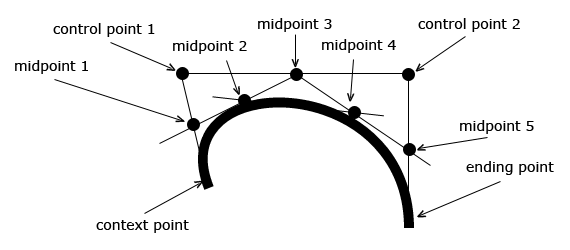
To create a Bezier curve with HTML5 Canvas, we can use the bezierCurveTo() method. Bezier curves are defined with the context point, two control points, and an ending point. Unlike quadratic curves, Bezier curves are defined with two control points instead of one, allowing you to create more complex curvatures.
HTML5 Canvas Bezier Curve Example
Open in new windowCode Editor
HTML5 Canvas Bezier Curve Explanation
Take a look at the diagram above. A bezier curve is defined by the current context point, two control points, and an ending point. The first part of the curve is tangential to the imaginary line that is defined by the context point and the first control point. The second part of the curve is tangential to the imaginary line that is defined by the second control point and the ending point.

Just came across some cross browser differences that took me a while to troubleshoot. Firefox and Opera can draw a bezier curve to and from the same starting point. Chrome and Safari can’t.
With the following code, Firefox and Opera draw a drop:
context.beginPath();
var X = 188;
var Y = 130;
var controlX1 = 176;
var controlY1 = 158;
var controlX2 = 200;
var controlY2 = 158;
context.moveTo(X, Y);
context.bezierCurveTo(controlX1, controlY1, controlX2, controlY2, X, Y);
context.lineWidth = 1;
context.strokeStyle = “black”;
context.stroke();
To get the same thing with Chrome or Safari I had to make the curve end at a different spot. Changing the bezierCurveTo line to:
context.bezierCurveTo(controlX1, controlY1, controlX2, controlY2, X, Y+0.01);
Adding a tiny value to Y or X end point value gave me the drop in all four browsers.
@Andrew careful – that’s not quite correct. The reason you were seeing an inconsistency in results is because of the control points in your Bezier curve. I created a jsfiddle that slightly increases the width of the drop so that the Bezier curve could render properly. It renders correctly in all browsers without adjusting the end point.
http://jsfiddle.net/dZFZ4/
@Eric – Thanks for the reply. I get the same browser inconsistency on the jsfiddle page. It does not matter how much I move the control points. If I end the curve at the same place I start it, I do not see a line (or fill) in Safari or Chrome . This is true on two different Macs. One running Snow Leopard and the other Lion.
Why should the results be sensitive to the position of the control points?
@Andrew my apologies! You’re absolutely correct. When you said “I tried it on two different Macs”, I immediately thought that perhaps you had found a bug in Chrome running on OSX, and that was indeed the case. Drawing a teardrop whose starting point equals the ending point breaks in:
- Safari on Windows 7 & OSX
- Chrome on OSX
and you’re also correct that if you slightly adjust the ending point from the starting point, the tear drop renders correctly. Not sure if this is a bug with Webkit, or with Chrome and Safari, but it’s certainly a bug. Thanks for letting us know!
I’m still a little confused as to why I would want to do something with hours of coding that I could just as easily do with a few seconds of using the Illustrator pen tool.
@maxw3st I think you may be missing the point. If your application requires a simple static curve on the page, then of course it would make sense to use an image created with Illustrator or PhotoShop. Canvas is needed when you’re curves or shapes are dynamic. Here’s an example:
http://www.html5canvastutorials.com/labs/html5-canvas-modify-curves-with-anchor-points-using-kineticjs/
This of course, cannot be achieved with a static image.
Cheers!
Thanks Eric, I was completely missing the point! Just need to get further into your tutorials here to make all of this useful. It’s also fun to see the math going on behind Illustrator’s vector graphic images. Canvas looks to be awesome for creating interactive and adjustable graphics on web pages. Need to learn more. Unfortunately my time is going to be taken up learning ActionScript 3.0 over the next 11 weeks. But I will continue working at the lessons here as fast as I can.